Overview
The Biomass Calculator helps you accurately estimate crop biomass from plant population data. By leveraging precise AI Stand Count analysis, this tool enables farmers and agronomists to monitor crop growth, support early yield prediction, and make data-driven decisions to optimize field performance.
This tool is available within the following setup:
- Crop Monitoring Product
- Stand Count Analysis – providing accurate plant population data for reliable biomass estimation
How to Access
- Open the uploaded Drone map for the selected field.
- Go to the analysis results for Stand Count Analysis
- Click on the Tools tab.
- Select the Biomass Calculator
- The Biomass Calculator will appear on the right sidebar

How It Works
- Open the Corn Yield Calculator – Once you access the tool, the plant population (Stand Count) is automatically pre-filled based on the Stand Count analysis. This value cannot be edited, ensuring consistency and accuracy in yield calculation.
- Enter Plant Weight – Input the average weight of a single plant (in grams) and click Apply to proceed with the calculation.
💡 Note: When collecting plant mass, cut the plant at the harvester cutting height to ensure accurate measurement. - Select Measurement Units – The unit system is automatically aligned with your account settings (metric or imperial), ensuring consistency across all calculations.
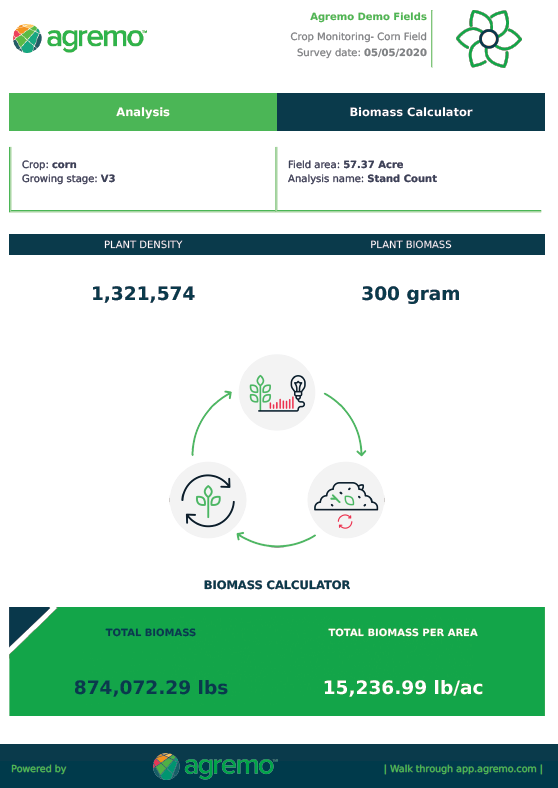
- View Biomass Results – The calculator generates results displayed under two key metrics:
- Biomass per area
- Total biomass for the field
5. Export Results – Once the calculation is complete, you can click on Export Tool Results to download a detailed PDF report. The report includes all input parameters and calculated Biomass values, making it easy to share insights or use them for further analysis.